How to Write Effective Prompt Instructions: A Complete Guide for Creators and Teams
How to Write Effective Prompt Instructions: A Complete Guide for Creators and Teams
Introduction
If you build or manage workflows that involve AI, human contributors, or hybrid systems, the quality of your prompt instructions is everything. Clear, well-crafted prompts reduce iteration time, improve output quality, and align teams around shared expectations. In this guide you’ll learn why prompt instructions matter, proven frameworks for writing them, practical templates you can apply across use cases, and measurement techniques to continuously improve prompts. By the end, you’ll be able to write prompt instructions that save time, reduce ambiguity, and produce consistent, high-quality results — whether you’re briefing an AI model, outsourcing tasks to contractors, or coordinating internal teams.
Why Prompt Instructions Matter
Good prompt instructions act like a contract between the requester and the performer (human or machine). They set scope, define quality, reduce rework, and encode institutional knowledge. When instructions are weak or vague, outputs vary wildly, stakeholders lose trust, and teams waste time clarifying requirements.
Key benefits of strong prompts:
- Consistency: Clear rules produce repeatable results.
- Efficiency: Less back-and-forth and fewer revisions.
- Scalability: Easier onboarding and delegation.
- Traceability: Easier to diagnose errors and refine processes.
- What: task to complete
- Who: target audience
- Why: objective or KPI
- When: deadline or timing needs
- Where: platform or context
- How: format, constraints, voice
- First-pass acceptance rate (%) — percent of outputs accepted without revision.
- Time-to-satisfactory output — hours or minutes until approved result.
- Error types and frequency — categorized QA findings.
- User satisfaction score — feedback from stakeholders or end users.
- Accuracy (0–5)
- Relevance (0–5)
- Tone match (0–5)
- Formatting (0–5)
- Overall usefulness (0–5)
- Vague goals: Fix by adding measurable outcomes.
- Too many requirements at once: Prioritize and split tasks.
- No examples provided: Always include at least one good sample.
- Conflicting instructions: State priority order explicitly.
- Overfitting to an example: Use multiple examples to broaden style.
- Prompt library: Centralize approved prompts with version history and tags.
- Ownership: Assign a prompt steward or content owner per domain.
- Review process: Peer review prompts like code reviews.
- Training: Teach teams prompt-writing best practices and run workshops.
- Audit: Regularly audit prompt usage for bias, accuracy, and compliance.
- Have I stated the goal in one sentence?
- Is the audience defined?
- Have I listed format and length constraints?
- Did I include examples and counter-examples?
- Are priorities and evaluation criteria clear?
- Have I added any compliance or accessibility constraints?
- Is the role or persona specified?
- Did I include desired tone and style?
- “content strategy checklist” -> /content-strategy/checklist
- “product page templates” -> /templates/product-pages
- “onboarding documentation guide” -> /docs/onboarding-guide
- OpenAI documentation (https://platform.openai.com/docs) — for model capabilities and best practices.
- W3C Web Content Accessibility Guidelines (https://www.w3.org/WAI/standards-guidelines/wcag/) — accessibility standards.
- Nielsen Norman Group (https://www.nngroup.com) — UX research on clarity and usability.
- Primary keyword: “prompt instructions” — use naturally across title, intro, and subheadings with ~1–2% density.
- Use semantic keywords: prompt engineering, prompt templates, prompt library, instruction clarity.
- Optimize title tag and meta description: Keep title under 60 characters and meta description under 160 characters, including the primary keyword.
- Add structured data: Use Article schema with headline, author, datePublished, description, and image.
- Create tweetable quotes and LinkedIn preview copy.
- Suggested tweet: “Clear prompt instructions save time and improve quality. Learn proven templates, QA rubrics, and governance best practices.” (Include article link and relevant hashtags like #PromptEngineering #AI)
- Suggested LinkedIn blurb: A short paragraph that highlights the main benefit and links to the article.
- Hero image: “Person writing prompt instructions on a laptop — prompt engineering concept”
- Template screenshot: “Example prompt template with labeled sections”
- Flow diagram: “Modular prompt workflow showing decomposition and chaining”
- “@context”: “https://schema.org”
- “@type”: “Article”
- “headline”: “How to Write Effective Prompt Instructions: A Complete Guide for Creators and Teams”
- “author”: {“@type”:”Person”,”name”:”[Author Name]”}
- “datePublished”: “[YYYY-MM-DD]”
- “image”: “[URL to hero image]”
- “description”: “[150–160 char meta description including primary keyword]”
- Soft CTA: Sign up for our newsletter for weekly prompt templates and case studies.
- Strong CTA: Try the provided blog post and product description templates this week — track first-pass acceptance and share results to optimize your library.
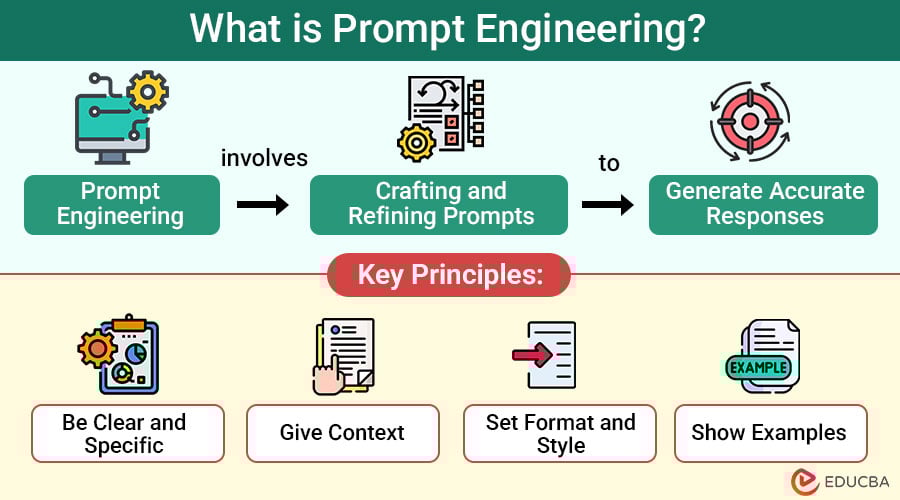
Core Principles of Effective Prompt Writing
Crafting prompts is partly art, partly science. Apply these core principles every time:
1. Be explicit about the goal
Start with the desired outcome. Use one or two sentences to state what success looks like. Example: “Generate a 500-word product description that convinces first-time buyers of product X’s value, emphasizing durability and sustainability.”
2. Define the audience and tone
Who will read the output? Specify demographic and intent. Example: “Audience: budget-conscious parents aged 25–40. Tone: friendly, reassuring, and slightly humorous.”
3. Include constraints and format requirements
Word count, headings, bullet points, image alt text, file types, or any forbidden content should be explicit. Constraints reduce guesswork.
4. Provide examples and counter-examples
Show good outputs and bad ones. Examples reduce ambiguity by illustrating expectations.
5. Use step-by-step structure for complex tasks
Break multi-step tasks into numbered steps. This is critical when chaining actions or combining data sources.
6. Prioritize instructions
When multiple requirements conflict, tell the model or person which ones are most important.
7. Iterate quickly with evaluation criteria
Include objective quality checks (QA checklist or rubric) so outputs can be scored and improved.
Prompt Frameworks You Can Use Today
Below are repeatable frameworks that work across use cases.
1. The 5W+H Prompt
What, Who, Why, When, Where, How. Use this for broad clarity.
Example:
What: Write a landing page hero section.
Who: SaaS founders evaluating onboarding tools.
Why: Increase trial sign-ups.
When: Final copy due in 48 hours.
Where: Website hero, desktop and mobile.
How: 40–60 words; headline + subhead + CTA; include value props.
2. The AIDA Prompt (Attention, Interest, Desire, Action)
Use for marketing copy and persuasive content. Specify each stage’s required output.
3. The Role + Instruction Pattern
Start by assigning a role, then give instructions. “You are a product copywriter. Write…” This primes the model or contributor.
4. The Example-Driven Prompt
Provide one or more ideal examples, then ask for similar outputs. This is powerful with LLMs—models mimic provided style.
Templates for Common Use Cases
Use these templates and adapt them to your needs.
1. Writing a Blog Post
Prompt template:
You are an experienced content marketer. Write a [length] blog post for [audience] about [topic]. Include: an SEO-optimized title with target keyword “[keyword]”, an intro (150–200 words) that hooks readers, H2 and H3 subheadings, short paragraphs, a bulleted list of key takeaways, and a conclusion with a clear CTA. Tone: [tone]. Cite credible sources and include suggested internal links to “[internal page]” and external links to authoritative sources like “[example source]”. Provide image alt text for hero and supporting images.
2. Generating Product Descriptions
Prompt template:
You are a persuasive product copywriter. Write a [word count] product description for [product name]. Audience: [persona]. Highlight top 3 benefits, include technical specs in a bullet list, and finish with a 10-word CTA. Tone: [tone]. Limit claims to verifiable facts.
3. Creating Technical Documentation
Prompt template:
You are a senior engineer writing documentation. Create a step-by-step guide for [task]. Include code snippets, expected outputs, troubleshooting tips, and a change log. Use numbered steps and short paragraphs. Provide sample commands for [platforms].
4. Briefing a Designer
Prompt template:
You are a UX designer creating a mobile onboarding flow for [product]. Objectives: [primary goals]. Users: [persona]. Deliverables: [screens, assets]. Constraints: [brand colors, fonts, accessibility guidelines]. Success metrics: [completion rate, NPS]. Include wireframe examples and references to apps with similar flows.
Advanced Techniques for High-Quality Prompts
To get top-tier outputs, try these advanced methods.
1. Chain-of-thought and decomposition
For reasoning tasks, ask for the steps the model should take before the final answer. This improves explainability and accuracy.
2. Few-shot learning with curated examples
Include 3–5 examples showing the exact format and quality you want. Mixing good and poor examples helps define boundaries.
3. Use constraints to force creativity
Paradoxically, constraints (like “no buzzwords” or “use 3 vivid metaphors”) can improve creative output by narrowing choices.
4. Test with A/B prompt variations
Create multiple prompts that vary a single element (tone, length, role) and compare outputs against your rubric.
5. Build modular prompts
Split a complex workflow into small prompts that feed into each other. Store and version them so you can reuse and iterate.
Quality Assurance: Measuring Prompt Performance
You need objective metrics to know if a prompt is working.
Key metrics:
Create a simple rubric:
Run periodic reviews and track trends. When performance drops, run prompt A/B tests or update the examples and constraints.
Common Prompt Pitfalls and How to Avoid Them
Real-World Case Studies
Case study 1 — Marketing agency:
A mid-size marketing agency reduced content revisions by 60% after standardizing a blog post prompt that included audience, SEO keyword, structure, examples, and acceptance criteria. They tracked first-pass acceptance using a simple Airtable workflow.
Case study 2 — E-commerce retailer:
An online retailer used role-based prompts and product templates, raising conversion on product pages by 12% when copy followed the new pattern emphasizing benefits and trust signals.
Case study 3 — Internal docs at a SaaS:
A SaaS company modularized onboarding tasks into smaller prompts and automated parts of the handbook generation. Time to publish new docs dropped from two weeks to three days.
Collaboration and Governance: Scaling Prompts Across Teams
As organizations scale, a governance model prevents fragmentation.
Accessibility, Privacy, and Ethical Considerations
Explicitly include accessibility requirements (alt text, plain language), data handling rules, and privacy constraints in prompts. Avoid asking models to generate or store personal data unless properly secured. Monitor outputs for biased or harmful language and include steps to sanitize sensitive content.
Templates and Checklists You Can Copy
Prompt-writing checklist:
Quick reusable prompt template:
You are a [role]. Produce a [format] for [audience] about [topic]. Goal: [primary objective]. Requirements: [list constraints]. Examples: [paste examples]. Evaluation: [rubric items]. Deadline: [date/time]. Tone: [tone].
Internal and External Linking Suggestions
Internal link suggestions (anchor text recommendations):
External authoritative links to include:
SEO and Social Sharing Optimization
SEO tips:
Social sharing:
Image Alt Text Suggestions
Schema Markup Recommendation
Use Article schema (JSON-LD) with these fields:
Ensure the published page includes sameAs links to author social profiles if available.
FAQ
Q: What’s the difference between a prompt and a prompt template?
A: A prompt is a single instruction for a task. A prompt template is a reusable structure with placeholders to adapt to different contexts.
Q: How long should a prompt be?
A: As long as needed to be unambiguous. Start with a concise goal sentence, then add constraints and examples. For complex tasks, break into modular prompts.
Q: How often should prompts be updated?
A: Review prompts quarterly or whenever KPIs change, models are updated, or you collect new examples.
Q: Can these prompts be used with any AI model?
A: Yes, but adjust format and examples to match the model’s strengths and API constraints.
Conclusion: Start Small, Iterate Fast
Writing great prompt instructions is a high-leverage skill. Start by standardizing a few high-impact prompts (like blog briefs, product descriptions, or onboarding flows), measure performance with a simple rubric, and then scale via a centralized library and governance. With the right templates, examples, and evaluation metrics, prompt instructions will consistently deliver clearer, faster, and more valuable outputs.
Bold takeaway: Clear, prioritized prompts with explicit examples and measurable evaluation criteria are the quickest path to reliable, high-quality results.
Call to action:
Author note: This guide synthesizes best practices from content, UX, and AI teams to help you write prompt instructions that work in real-world settings.